Book an Appointment
Call South Salt Lake Computer Repair Service at 
801-679-2640
                   

(801) 679-2640

*


South Salt Lake Computer Repair Service has provided the best mobile computer repair in South Salt Lake, UT and the greater Salt Lake City Metro Area since 1999. The term "mobile computer repair" means we come to you to resolve all your computer problems.

We repair laptops, desktops, PCs and Apple computers. One of our highly qualified staff will come to you, often the same day, to take care of all your repair needs.

Why not use the #1 rated company for computer repair in South Salt Lake, UT?

Computer Repair 4.9 / 5 stars from 289 reviews
Why use a computer tech when you can have a South Salt Lake based Computer Engineer? Mon-Sun 8:00am - 8:00pm

Call us at (801) 679-2640

Text us at (801) 679-2640

Email us your questions

Book an Appointment

"Jason was courteous, knowledgeable and efficient in his work. He resolved problems with both of my laptops. The work was completed in a timely manner and charges were quite reasonable."
South Salt Lake Computer Repair Service 5 / 5 stars
"Matt did a great job, solved a number of my issues , would recommend him and the company."
South Salt Lake Computer Repair Service 5 / 5 stars
"Ben is great at what he does. He was able to find out my problem within minutes. Great service and highly recommended!!!!"
South Salt Lake Computer Repair Service 5 / 5 stars
"Taylor was most helpful. Thorough and knowledgeable, 5 stars all the way."
South Salt Lake Computer Repair Service 5 / 5 stars
"I had the greatest experience with the technician. My computer is running better than it ever has. I had to get a new hard drive and he was able to ensure all my files came over and I did not lose anything. I am 1000% satisfied. He was awesome. He was very knowledgeable and personable. I would give him 100 stars."
South Salt Lake Computer Repair Service 5 / 5 stars

Who is South Salt Lake Computer Repair Service?

South Salt Lake Computer Repair Service is owned by Matt Karls, an Electrical Engineer and a Computer Systems Engineer. We are a team of computer professionals focused on service and quality, all our work is guaranteed.

If you have any computer, technology or IT problem in South Salt Lake, UT we can fix it. We have been performing computer repair in South Salt Lake full time since 1999. Feel free to give us a call or text us at (801) 679-2640.

South Salt Lake Computer Repair Service's Computer Engineer

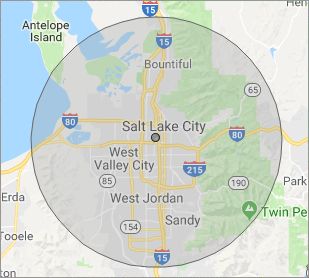
What is your Service Area for on-site Computer Repair?

Our primary on-site mobile service areas include the greater Salt Lake City metropolitan area and the Phoenix, Tucson, Las Vegas and San Diego metro areas.

We provide remote and mobile computer repair in South Salt Lake, Bluffdale, Bountiful, Centerville, Cottonwood Heights, Draper, Farmington, Herriman, Holladay, Kearns, Magna, Midvale, Millcreek, Murray, North Salt Lake, Riverton, Salt Lake City, Sandy, South Jordan, Taylorsville, West Jordan, West Valley City and Woods Cross.

Our on-site Computer Service Area

What should someone expect that hires you for Computer Service?

Our mission is to fully resolve your computer problems quickly and affordably. If you want a Computer Engineer that can fix all of your computer problems instead of a computer tech, a computer geek, a technician or a computer guy that can only fix some of your problems; call us at (801) 679-2640.  

What types of Computer Services do you perform?

We service businesses and business clients in their homes, including:
 
  • Diagnose / repair hardware or software problems
  • Spyware, malware, trojan and virus removal
  • Setup wireless and small business networks
  • Laptop repair, PC repair and Apple repair
  • Hard drive data recovery

South Salt Lake Computer Repair Service Contact Information

South Salt Lake Computer Repair Service
(801) 679-2640

South Salt Lake Computer Repair Service is a Karls Technology company

* *
*
*
*
  *
* *


*
*
* * * * * * * * * * * * * * *
4.9 / 5 stars from 289 reviews

"I had a major computer failure that I couldn't resolve. As it might have been a hardware conflict, I wanted a tech to check out the system at home with everything connected. Taylor came out actually ahead of schedule, ran the diagnostics and the issue was resolved. I couldn't be happier with the service and professionalism. Thank you."

South Salt Lake Computer Repair Service 5 / 5 stars

"Matt was excellent. He explained my problems in a way I could understand and fixed them all! I would highly recommend this computer company."

South Salt Lake Computer Repair Service 5 / 5 stars

"Excellent, all is working, thank you."

South Salt Lake Computer Repair Service 5 / 5 stars

"Ben came out to help us with our laptop after we had an issue with a virus and he was very helpful and informative on the matter. He was very respectful and kind in our home. Glad we put our trust in him, would recommend to friends and family!"

South Salt Lake Computer Repair Service 5 / 5 stars
Best Antivirus Software of 2026: The Ultimate Guide to Cybersecurity Brands

In 2026, the digital threat landscape has shifted. We are no longer just fighting simple viruses; we are defending against AI-generated phishing, sophisticated ransomware-as-a-service, and complex identity theft. Choosing the right antivirus brand is no longer optional—it is the foundation of your digital life. At Karls Technology, we’ve analyzed the top-performing security suites of the […] The post Best Antivirus Software of 2026: The Ultimate Guide to Cybersecurity Brands appeared first on Computer Repair Blog.

Calculator App Easy Features

The Calculator App has been around since 2008. Over the years, the application has been given a more modernized look. But some users didn’t know about certain features. First off, if you put in the wrong numbers, you can’t delete the numbers one at a time. The Calculator app resets to square one if you […] The post Calculator App Easy Features appeared first on Computer Repair Blog.

Add Your Own Keyboard Shortcut

Simple tasks like accessing a web page may be accomplished with a single click of a button rather than by inputting a URL, browsing through directories, or selecting individual icons. Keyboard shortcuts, or “hotkeys,” are combinations of keys that, when pushed simultaneously, perform a predetermined action. To create a shortcut, locate the file or directory […] The post Add Your Own Keyboard Shortcut appeared first on Computer Repair Blog.

If Your Computer Won’t Turn On, Here May Be Why

The last thing users need to happen when they’re about to jump on their PC is for it not to turn on. There is a possibility that your computer may not switch on because the power supply is broken or has died. If the computer’s power supply is malfunctioning, the components of the machine will […] The post If Your Computer Won’t Turn On, Here May Be Why appeared first on Computer Repair Blog.

Check Graphic Cards Temperature

The graphics card is the brains of any good gaming computer. Graph cards are especially prone to irregularity and failure after months without being properly cared for and maintained. Obviously, the best way to maximize the usefulness of your GPU and lengthen its lifespan is to prepare for it in advance. They are responsible for […] The post Check Graphic Cards Temperature appeared first on Computer Repair Blog.

Focus Assist on Windows 11

Focus Assist made its debut in Windows 10 in 2018, and while it was useful before, its capabilities have greatly expanded in Windows 11. Pro and Con of Focus Assist Notifications have the potential to drastically decrease productivity by diverting our attention to something else. Turning off alerts, however, has the potential to backfire in […] The post Focus Assist on Windows 11 appeared first on Computer Repair Blog.

Force Quit on MacOS

Control-Alt-Delete is the same thing as Option + Command + Esc in macOS. Make use of this keyboard shortcut to bring up the window to force quit applications, which will allow you to view what programs are currently active on your computer. You also have the option of selecting Force Quit from the Apple menu. […] The post Force Quit on MacOS appeared first on Computer Repair Blog.

If Your Computer Has Been Hit with Ransomware

Do a fresh install of Windows if you’ve been infected with ransomware. Computers in the network should be disconnected. Turn them off until you’ve cleaned all the systems. Operating systems like Windows 10 and MacOS allow for speedy reformat and fresh installations. Antivirus software should be set up after an OS has been installed. A […] The post If Your Computer Has Been Hit with Ransomware appeared first on Computer Repair Blog.

What is System Restore?

System Restore is a useful Windows feature that allows you to restore any changes made to your computer’s settings to a previous save point. As a result, if a computer has system-related issues, the System Restore feature will use the restore point to revert to those settings from the current one. To use this feature, […] The post What is System Restore? appeared first on Computer Repair Blog.

Using Multiple Monitors

If you’re using multiple monitors, you may simply drag a window over to the side by pressing the Windows key and the appropriate arrow keys. Windows + P instantly enables a second monitor, while Shift + Windows Key + Arrows transfers the window to the next available monitor. Mission Control allows Mac users to view […] The post Using Multiple Monitors appeared first on Computer Repair Blog.